Halloween AI video effects for the photo you already took
A Halloween AI video does not need a script: one good costume photo and a short motion prompt are enough for Wan 3.0 image to video. Pick one of the six effects below, upload your photo as the first frame, and Wan adds the fog, the flicker or the ghost in the mirror while keeping your face and costume from the still.
Every effect is a motion prompt for Wan 3.0 image to video. The picture on each card is the starting frame — a fictional portrait we staged for that effect — so you can see what kind of photo the prompt expects. Upload a photo with a similar setup, press "Use this look", and adjust the prompt if your scene differs.
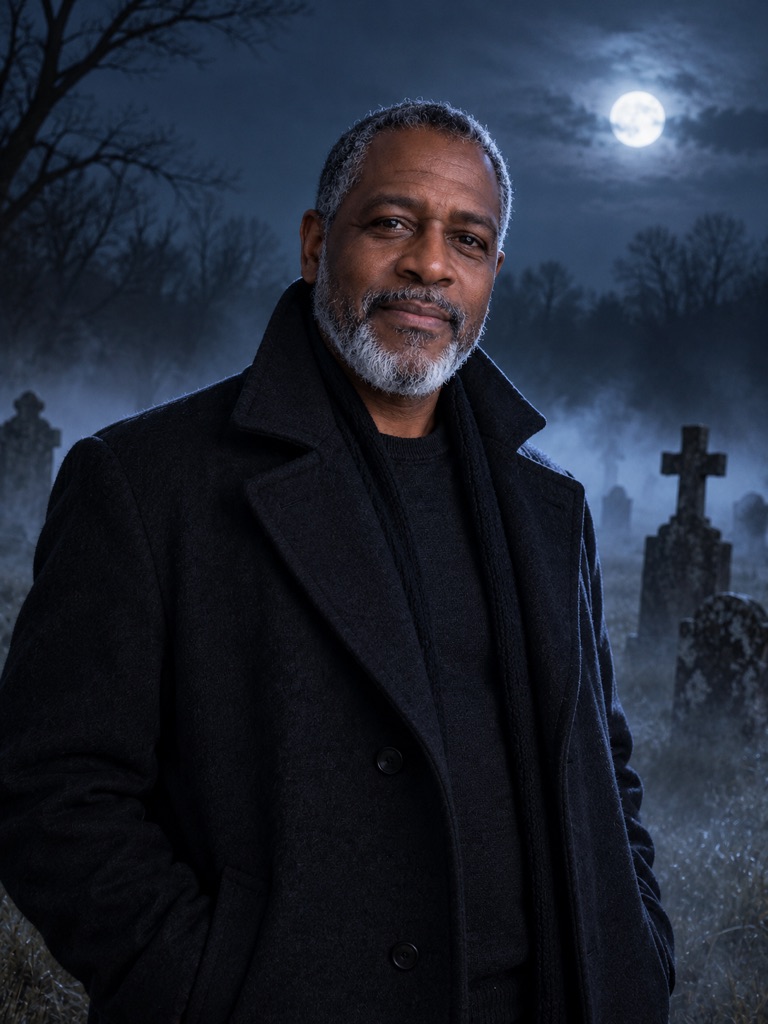
Graveyard Fog Push-In
Low fog rolls through a moonlit graveyard while the camera creeps toward you. The quietest effect here and the one that works on almost any dark costume photo.
Image-to-video motion prompt · Wan 3.0
Animate this photo as one continuous 5-second shot. Keep the person's face, skin tone, beard, age, costume and pose exactly as in the first frame. Low ground fog rolls slowly across the scene from left to right, drifting between the headstones and curling around the person's coat. The camera makes a very slow, steady push-in toward the face. The person stays still, blinks once and lets their breath show as a faint mist in the cold air. Moonlight stays cool blue and consistent. Sound: soft wind and a distant owl. No new people, no text, no cuts, no change of identity or clothing.
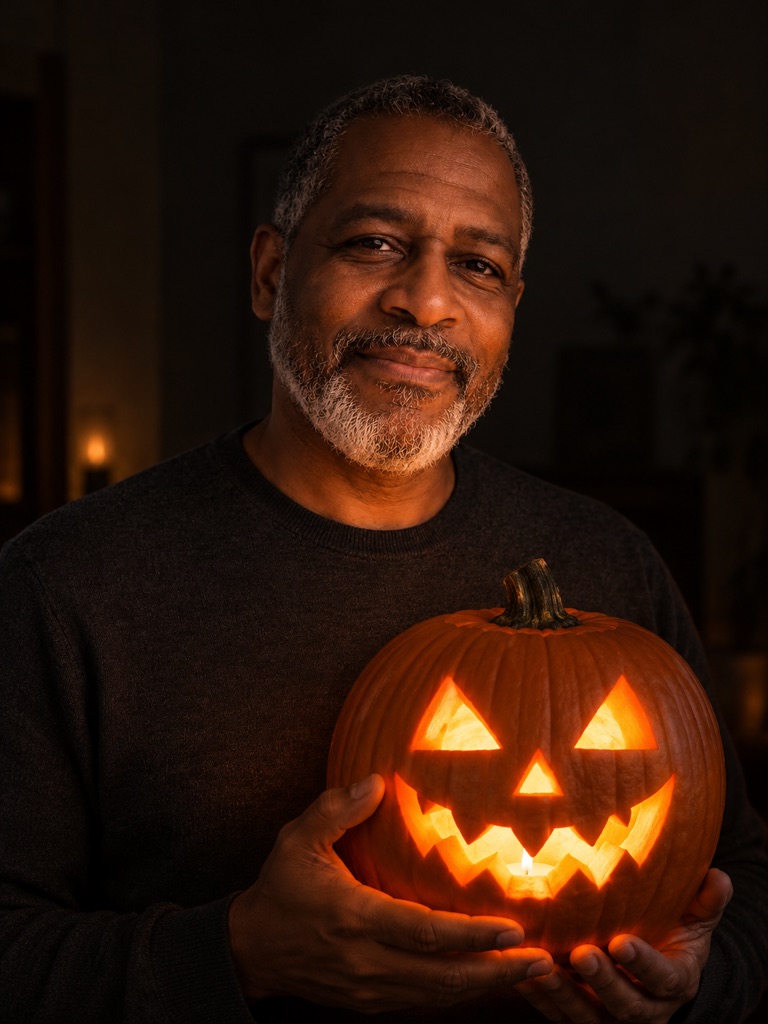
Jack-o'-Lantern Eye Flicker
You hold a carved pumpkin; its eyes and grin flicker from a candle inside and the glow plays across your face. Made for a carved-pumpkin photo.
Image-to-video motion prompt · Wan 3.0
Animate this photo as one continuous 5-second shot. Keep the person's face, skin tone, beard, expression, clothing and the carved pumpkin exactly as in the first frame. The candle inside the jack-o'-lantern flickers: its carved eyes and grin pulse brighter and dimmer in warm orange, and the moving glow plays across the person's hands, chin and face. The person slowly raises the pumpkin a few centimetres and gives a small, knowing smile. The camera stays locked. Background stays dark. Sound: a soft candle crackle and a low autumn wind. No fire spreading, no new people, no text, no cuts.
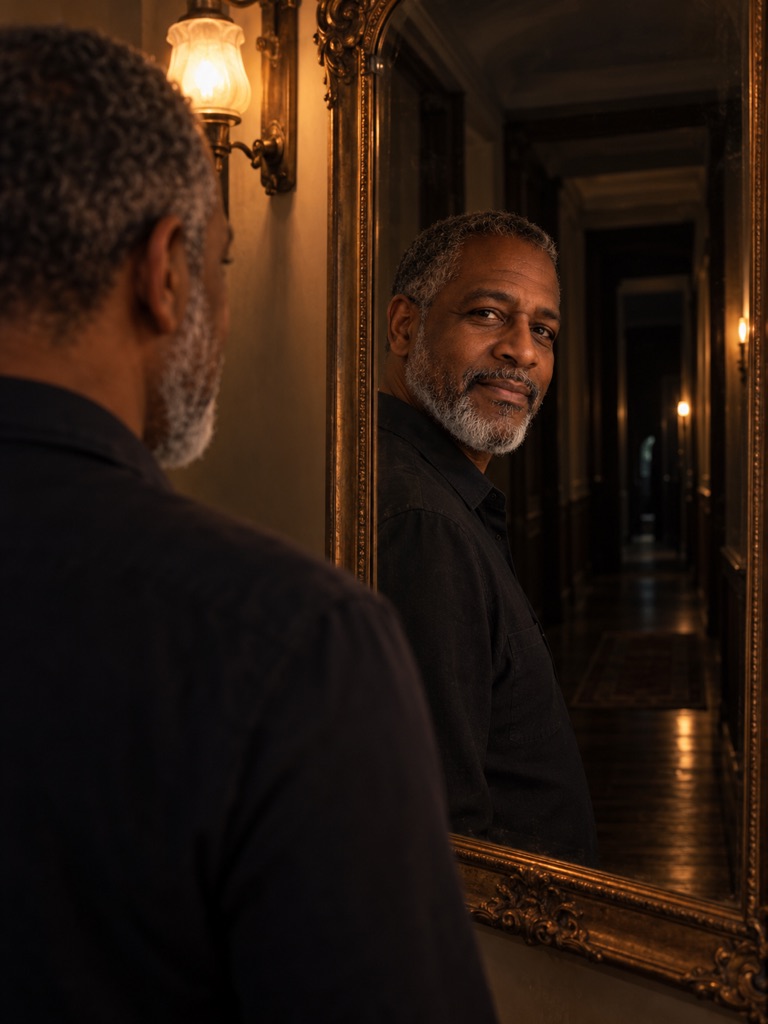
Mirror Ghost Reveal
You stand at an antique mirror in a dim hallway. A pale figure appears behind you in the reflection only, then fades. Needs a photo with a mirror in it.
Image-to-video motion prompt · Wan 3.0
Animate this photo as one continuous 5-second shot. Keep the person's face, skin tone, beard, clothing and the antique mirror exactly as in the first frame. The person looks into the mirror and slowly adjusts their collar. Two seconds in, a faint, translucent pale figure in a long white nightgown appears in the mirror reflection only, standing in the dark hallway behind the person, its face hidden in shadow. It stays for a moment, then fades away as the person turns their head slightly, sensing something. The camera stays still. The hall light flickers once. Sound: a ticking clock and a soft breath. No gore, no extra people outside the mirror, no text, no cuts.
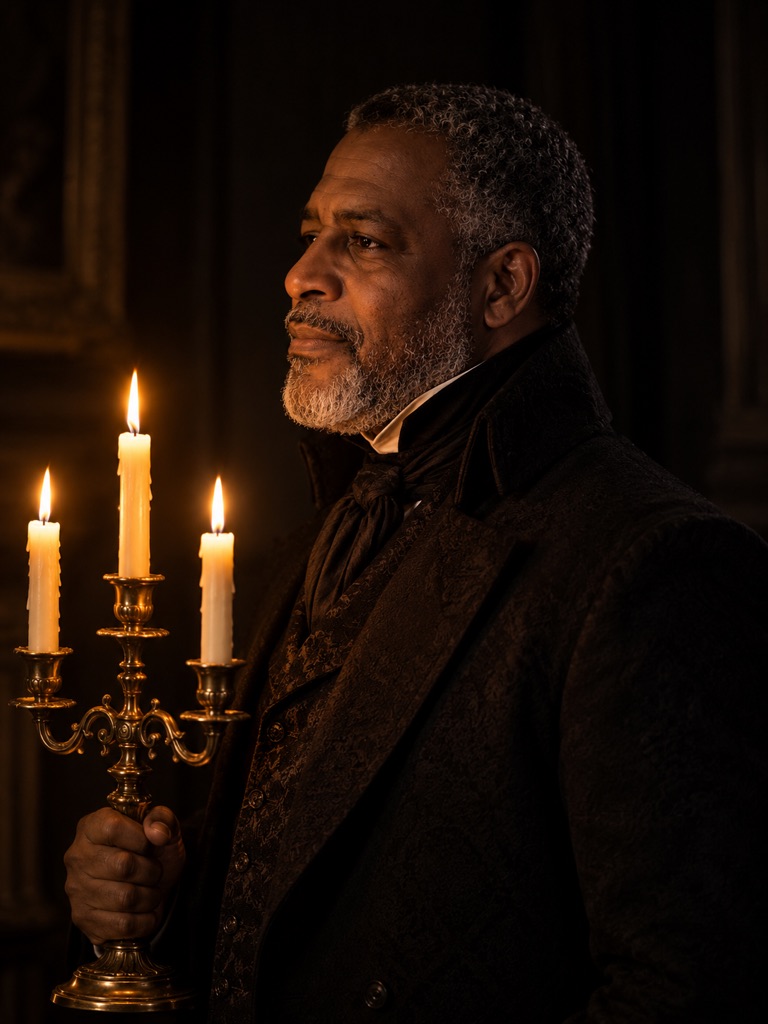
Candlelit Head Turn
A side profile lit by a candelabra slowly turns to face the camera as the flames lean. Gothic and simple; any costume with a dark backdrop suits it.
Image-to-video motion prompt · Wan 3.0
Animate this photo as one continuous 5-second shot. Keep the person's face, skin tone, beard, age, costume and the candelabra exactly as in the first frame. The person starts in profile and slowly turns their head to look straight into the camera, eyes meeting the lens on the final second. The three candle flames lean and flicker as if a draught passes through the room, and the warm light shifts across the face. Smoke curls up from one wick. The camera makes a tiny drift closer. Deep shadows, warm amber light only. Sound: candle flutter and a distant church bell. No new people, no text, no cuts, no change of identity.
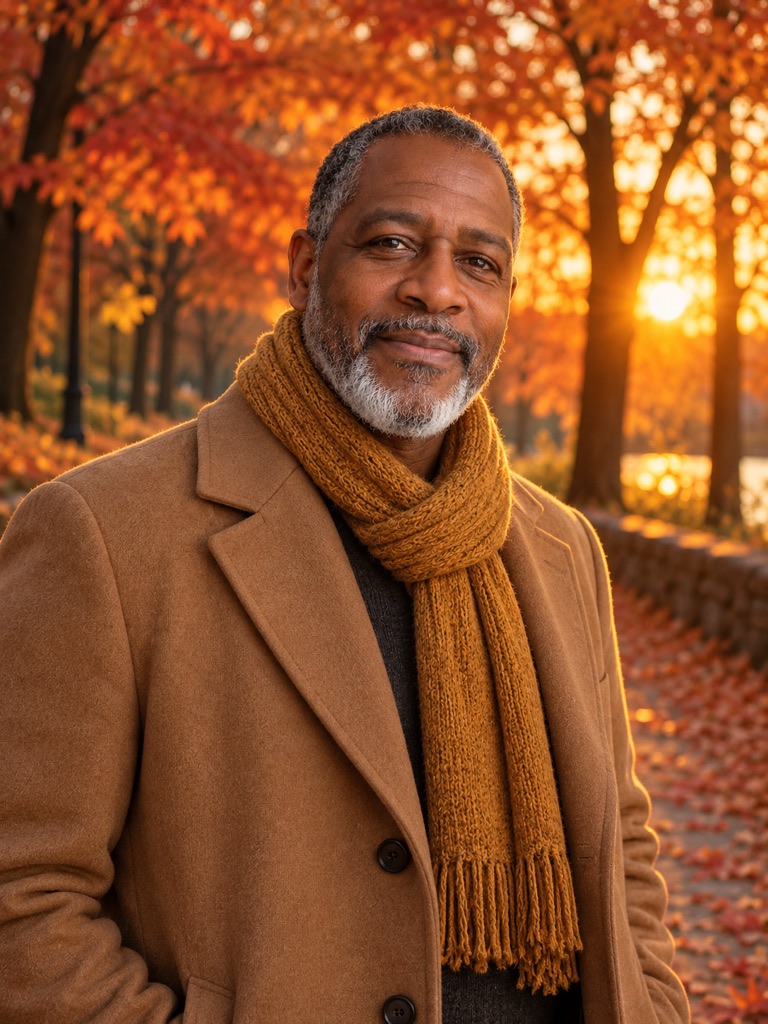
Dusk Leaf Fall
Orange maple leaves drift down around you at sunset with a gentle breeze. The cosy, not-scary option for a fall portrait.
Image-to-video motion prompt · Wan 3.0
Animate this photo as one continuous 5-second shot. Keep the person's face, skin tone, beard, scarf, coat and pose exactly as in the first frame. Orange and red maple leaves fall slowly around the person and drift across the frame at different depths, a few landing on the path. A gentle breeze moves the scarf and the branches. The person looks up at the falling leaves and smiles. Low golden-hour sun flickers through the trees. The camera makes a slow arc a few degrees to the right. Sound: rustling leaves and distant children's laughter. No new people in the foreground, no text, no cuts.
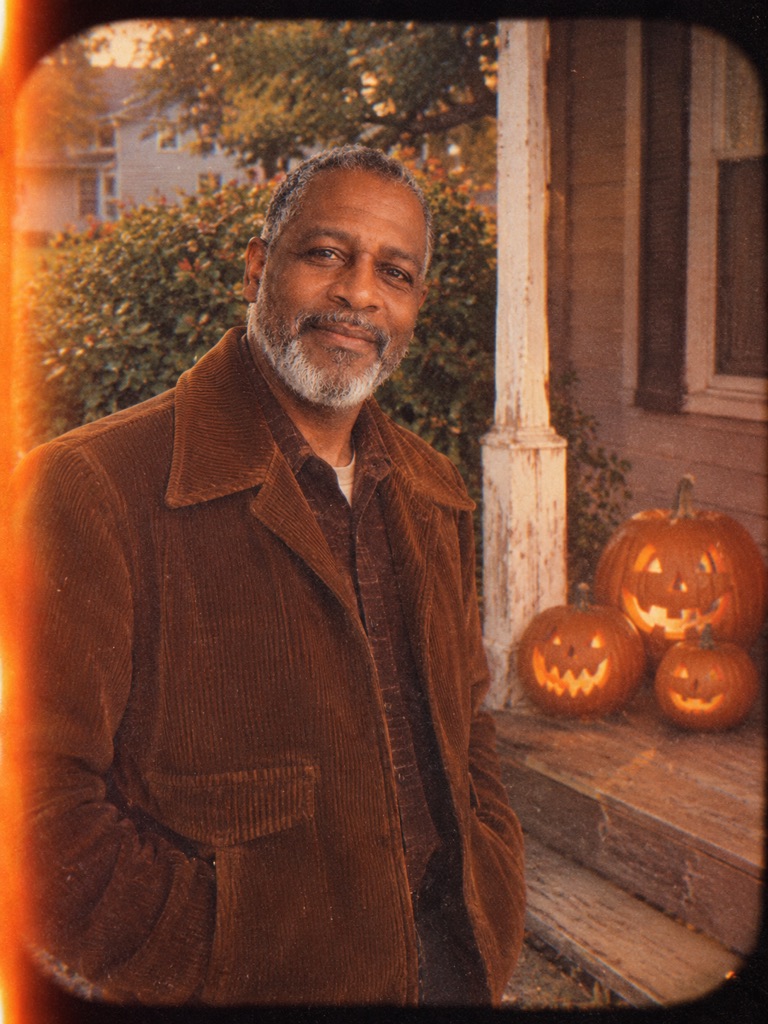
Super 8 Porch Haunt
Your porch photo becomes a 1970s home movie: gate weave, light leaks and a bed-sheet ghost crossing the yard behind you.
Image-to-video motion prompt · Wan 3.0
Animate this photo as one continuous 5-second vintage 8mm home-movie shot. Keep the person's face, skin tone, beard, clothing, the porch and the pumpkins exactly as in the first frame. The person waves at the camera and laughs. Behind them, a classic bed-sheet ghost with two cut-out eye holes walks slowly across the front yard from right to left and disappears behind a bush. Add film gate weave, slight flicker, warm faded colours, soft focus, dust specks and a brief orange light leak. Handheld camera with gentle wobble. Sound: projector whirr only. No modern objects, no text or dates, no cuts.
Card images are starting frames, not videos. They were made from one fictional AI-generated portrait with ChatGPT image generation during testing. Your video is generated by Wan 3.0 from the photo you upload, and results vary.
Animate your Halloween photo
"Use this look" selects Wan 3.0 Image to Video and loads the motion prompt. Upload your photo as the first frame, keep 5 seconds and 480p for a first draft, and check the credit quote before you generate.
Add inputsAttach images, videos, or audio that are part of what you want to create.
0/2
JPG, PNG, WebP · 20 MB max
0/5
MP4, WebM, MOV · 100 MB max
0/5
MP3, WAV, M4A, FLAC · 50 MB max
Just add the material you need. The generator will use it automatically.
0 / 5000
Wan 3.0 is selected by default with deep thinking and native audio on. Switch modes to direct with a first frame and optional last frame, or with multimodal references; drop to Seedance tiers when you want cheaper drafts.
These are image-to-video effects: your photo is the first frame and the prompt describes only what moves.
Subtle motion reads best in 5 seconds — drifting fog, a flicker, a slow head turn — rather than big action.
Wan 3.0 image to video costs 2 credits per second at 480p, 4 at 720p and 8 at 1080p, so a 5-second draft at 480p is 10 credits.
Each card shows the starting frame we used, not the video. Your clip is rendered by Wan 3.0 from your own photo.
What makes a photo animate well
Image to video starts from your picture and invents only the motion, so the photo decides most of the result. Wan keeps what it can see; it cannot keep what is cropped out, blurred or hidden.
Face fully visible and in focus, ideally at eye level. Masks that cover the whole face make identity harder to hold.
Leave space around the subject for fog, leaves or a ghost to move through. A tight crop leaves the effect nowhere to go.
Match the effect to the photo: the mirror effect needs a mirror in frame, the pumpkin flicker needs a lit pumpkin.
Dark scenes are fine, but avoid heavy noise — grain in the first frame can turn into crawling texture.
Crop to the shape you want to post before uploading: portrait for Reels and TikTok, square for feeds.
How to write your own Halloween motion prompt
Every prompt on this page follows the same order, and it is worth keeping when you write your own. Wan 3.0 reads layered instructions well, but in 5 seconds there is room for one main movement and one atmospheric one.
Keep: say what must not change — face, skin tone, hair, costume, pose.
Move: one subject action (a blink, a head turn, a wave) and one ambient motion (fog, flicker, falling leaves).
Camera: locked, a slow push-in or a small arc. Avoid fast moves on portraits.
Sound: Wan 3.0 adds native audio, so name it — wind, candle crackle, a projector whirr.
Avoid: new people, text, cuts and changes of identity.
From costume photo to clip: length, quality and cost
Start every effect at 5 seconds and 480p (10 credits). That draft tells you whether the face holds and the effect reads. When it works, render the same prompt at 720p (20 credits for 5 seconds) or 1080p (40 credits). Longer clips are possible — Wan 3.0 image to video goes up to 30 seconds — but these effects are built around a single moment and rarely need more than 10.
If you want the clip to end on a particular pose, add an optional last frame. Keep both images in the same light and costume so the motion between them stays believable.
Pairing this with a costume photo
Most people come here with a finished costume photo, from a party or from an AI costume generator. Popular ideas this year include haunted mascot looks inspired by the Buddy the Unicorn craze, glam country looks and classic sheet ghosts. Whatever you wear, the animation step is the same: one clear photo, one effect, five seconds. Only upload photos of yourself or of people who have agreed to it.
Frequently asked questions
Can I make a Halloween AI video from a selfie?
Yes. Choose Wan 3.0 Image to Video, upload the selfie as the first frame and use one of the motion prompts above. A selfie with some background works better than a tight crop of the face.
Are the card images AI videos?
No. They are the starting frames we staged for each effect, made from a fictional portrait with an open image model. The video is generated by Wan 3.0 when you run the prompt on your own photo.
Will my face change in the video?
Wan keeps the first frame as the starting point, and each prompt tells it to keep the face and costume. Small changes can still appear, especially with fast movement, so keep motion slow and check the 480p draft first.
Does the video have sound?
Yes. Wan 3.0 generates native audio by default, and each prompt describes it. You can switch audio off per request if you want to add your own music.
How much does a Halloween clip cost?
Wan 3.0 image to video costs 2 credits per second at 480p, 4 at 720p and 8 at 1080p. A 5-second 480p draft is 10 credits. Check the quote in the studio before generating.
Is wan3ai.im made by Alibaba?
No. wan3ai.im is an independent studio that runs the Wan 3.0 model; it is not affiliated with Alibaba.
Updated 2026-10-20. wan3ai.im is an independent resource and generation studio. It is not affiliated with, endorsed by, or connected to Alibaba. Wan, Wan 3, and Wan 3.0 are marks of their respective owner.